Digital National ID Verification in the Philippines 2026
How do you verify your Digital National ID in the Philippines? With the Philippine Identification System (PhilSys) Digital National ID, identity verification is now fast, secure, and official. A simple QR code scan instantly confirms your identity for banking, government services, and daily transactions.
Many Filipinos wonder “Why does my National ID verification fail?” or “What does ‘QR Code could not be read’ mean?” This guide answers all those questions and provides step-by-step official fixes, exact result messages, and best practices based on the latest PhilSys updates.
By the end, you will know how to verify your ID correctly, resolve common errors, and confidently use your Digital National ID in any official transaction.
What is Digital ID Verification in PhilSys?
Verification works through:
Digital national ID verification is the process of confirming your identity online using your Philippine National ID. Instead of presenting a physical card in person, you can complete the verification electronically through websites or mobile applications. It is managed by the Philippine Statistics Authority (PSA) in partnership with the Department of Information and Communications Technology (DICT).
How Digital National ID Verification Works (QR Code Method)
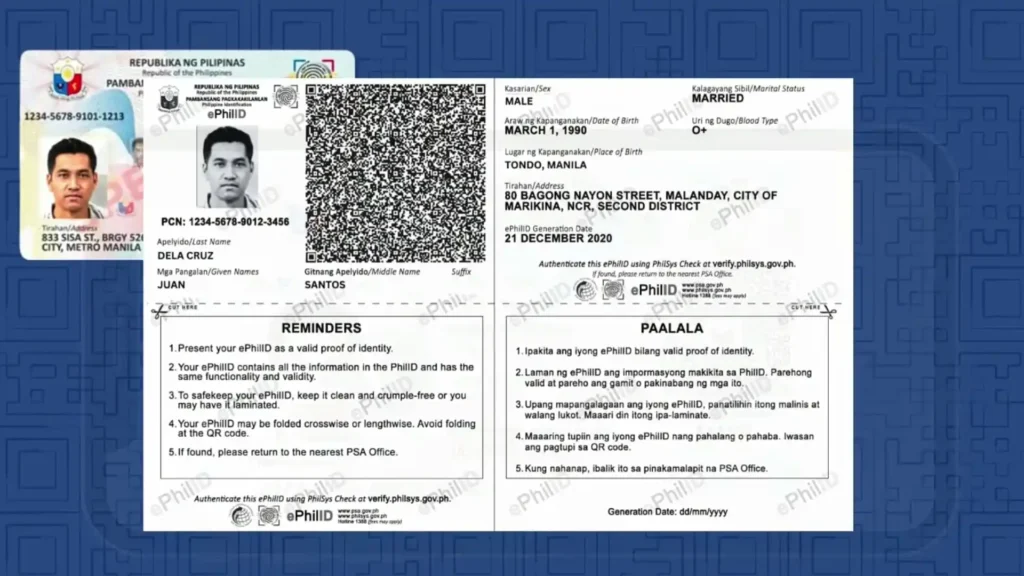
Every PhilSys ID includes a secure QR code used for instant verification.
Step-by-Step Verification Process
💡 Make sure:
PhilSys National ID Verification Successful
When verification is successful, the system displays:
“PhilID/ePhilID has been Verified”
Along with:
Note: On everify.gov.ph/check it may show ‘National ID has been Verified’ instead
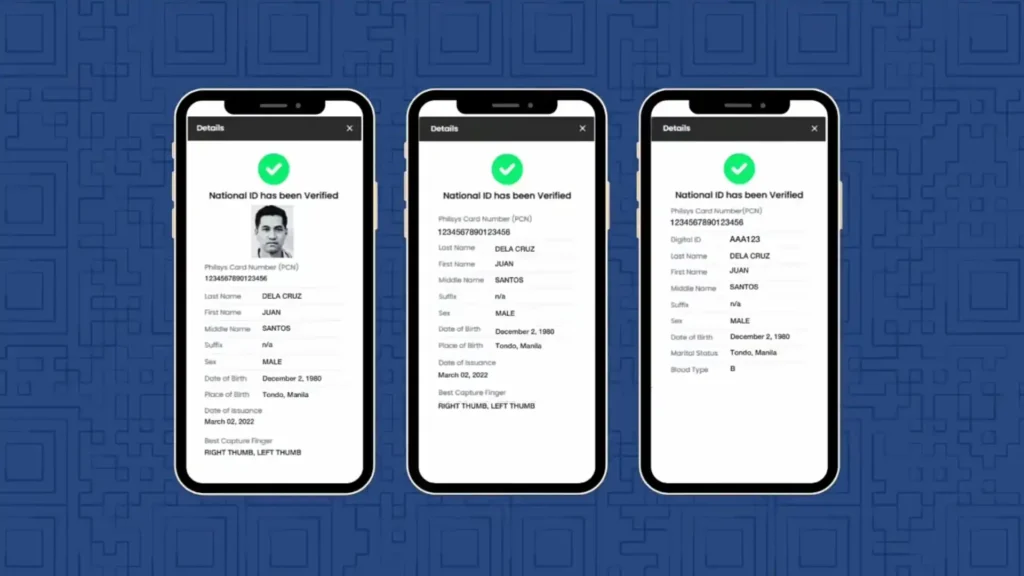
This confirms your ID is authentic, active, and untampered.
PhilSys National ID Verification QR Code Could Not be Read
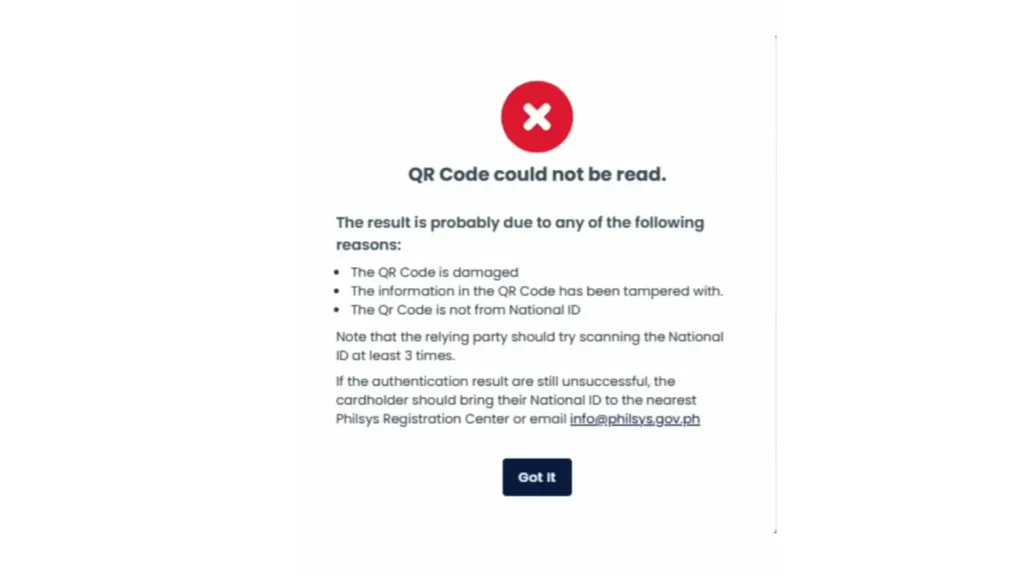
If your ID is not real, damaged or QR code is fake then you will see the message“QR Code Could Not be Read” on the screen.
PhilSys Verification Results Meaning
These are the only official results you will see on PhilSys ID verification
PhilID/ePhilID has been Verified
Deactivated Card
QR Code Could Not be Read
Important: Verification requires internet access (as confirmed in official PSA FAQs).
How to Verify ePhilID (Paper Format) or Physical Card
The ePhilID is the paper version of your National ID, offering a convenient alternative when the physical card is unavailable. The physical plastic card is the primary format of the Philippine National ID, delivered to your registered address.
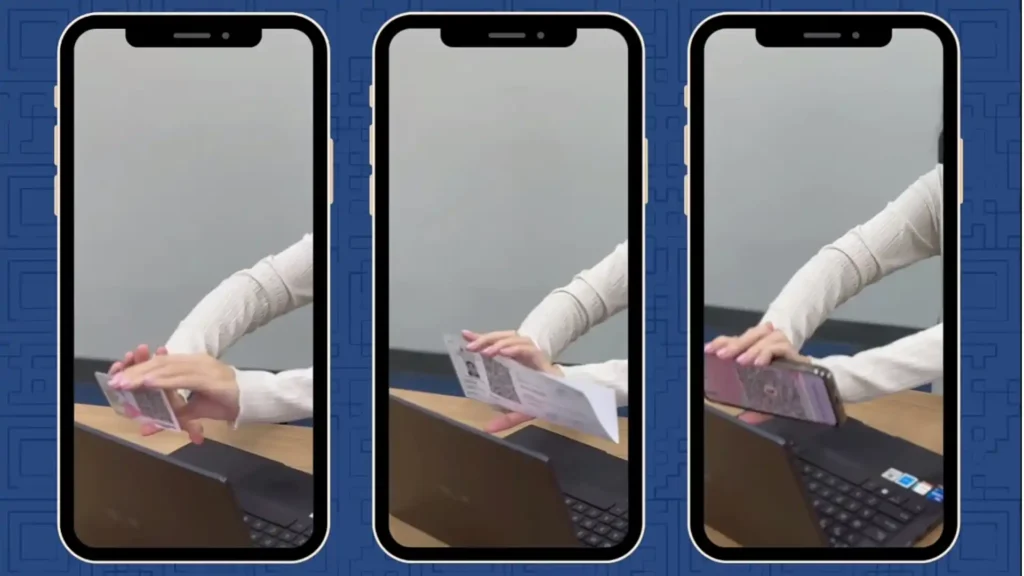
The same QR code scan works for ePhilID (paper) and physical plastic card on both official portals. Just scan the QR code exactly as described in the section above. No need to photograph the card, select any ID type, or type details.
In-Person Verification Method
Why “QR Code Could Not be Read” Appears: Common Causes
When you receive a “QR Code could not be read” error, it means the system could not successfully read or validate the QR code on your PhilSys ID. Here are the most common causes
Internet Connectivity Problems
Unstable internet connection can interrupt the verification process:
System Issues
Technical problems beyond your control include:
Damaged or Unclear ID Documents
Physical condition issues that prevent verification:
How to Fix National ID “QR Code Could Not be Read” Error?
Follow these systematic troubleshooting steps to resolve verification national id digital copy failures:
Step 1: Improve Your Scan
Step 2: Ensure Stable Internet Connection
A reliable internet connection is essential for national id digital verification online:
Step 3: Re-try at Better Times
The PSA system experiences heavy traffic during certain periods. Avoid these peak times:
High-traffic periods:
Recommended verification times:
Step 4: In-Person Verification
Still Not Working? Contact Official Support
Reach out to **PhilSys support:
Provide:
Why Do You Need Digital National ID Verification?
You need national id digital verification online for many things:
Over 90 million Filipinos now have a National ID. More services require digital verification every day.
PhilSys Digital ID Verification: Do’s and Don’ts
Do’s (Best Practices) | Don’ts (Avoid These Mistakes) |
|---|---|
Use only official websites like everify.gov.ph and verify.philsys.gov.ph | Don’t use unofficial apps or third-party websites |
Scan the QR code clearly with all edges visible | Don’t scan in poor lighting or at an angle |
Use a stable and secure internet connection | Don’t use public Wi-Fi for verification |
Verify your ID before presenting it for transactions | Don’t ignore verification error messages |
Keep a clear, official copy of your Digital National ID | Don’t rely on blurry or low-quality screenshots |
Share your ID only with trusted institutions | Don’t share your QR code publicly |
Double-check your details after successful verification | Don’t assume verification worked without checking |
Contact support if errors persist | Don’t delay reporting issues like “Deactivated Card” |
Keep your PhilSys Card Number (PCN) private | Don’t share your PCN unnecessarily |
Protect your device with security features | Don’t leave your phone or ID accessible to others |
Benefits of Digital National ID Verification
Using the Philippine Identification System (PhilSys) Digital National ID verification system offers far more than just convenience. It plays a key role in modernizing identity checks across the Philippines.
Instant and Real-Time Verification
Verification happens within seconds through QR code scanning. There’s no waiting, no manual checking, and no paperwork involved.
No Need to Carry a Physical ID
You can use your Digital National ID anytime from your phone. This is especially useful if your physical card hasn’t been delivered yet.
Accepted Nationwide Across Sectors
PhilSys verification is recognized by:
This makes it a universal proof of identity.
Strong Protection Against Fraud
The system validates a secure digital signature linked to the National ID Registry. This makes it extremely difficult to fake or duplicate identities.
Faster Transactions and Approvals
Whether opening a bank account or verifying identity for services, digital verification reduces processing time significantly.
Completely Free and Accessible 24/7
There are no fees to verify your National ID. Anyone can access the official portals anytime.
Supports Financial Inclusion
Many Filipinos without traditional IDs can now access banking and digital services using their PhilSys ID.
Works Across All PhilSys Formats
You can verify:
All formats are equally valid under the system.
Environment-Friendly and Paperless
By reducing reliance on printed documents, PhilSys supports a more sustainable, digital-first approach.
Conclusion
The Philippine Identification System (PhilSys) Digital National ID verification system makes identity checks in the Philippines fast, secure, and convenient. With a simple QR code scan, you can confirm your identity instantly for banking, government services, and everyday transactions.
Most verification issues are easy to fix when you follow the correct steps and use official platforms. Common problems like scan errors or connection issues can usually be resolved within minutes.
Digital National ID verification is now a reliable and widely accepted way to prove your identity nationwide. Using it properly helps you save time, avoid delays, and keep your personal information secure.

One Comment