How to Print Digital National ID (2026 Guide) – Fast & Easy
If you are wondering how to print digital national ID you are not alone. Many people want a paper copy or a clean printout they can carry or present to offices. Whether you are searching for national ID print, how to print national ID card, or where can I print my national ID, the good news is that it is simple and completely allowed.
The Philippine Statistics Authority allows you to print your National ID in paper form for everyday use. You may already have the official plastic card, the free paper ePhilID, or the digital version on your phone. All of these are valid, but having a printed copy makes things easier when someone asks for a physical ID.
In this guide, you will learn step by step how to print digital National ID using the eGovPH App, whether you can laminate it, and how to print your National ID online.
Different Ways to Get a Printed National ID
You have two main options for getting a printed version of your National ID
Both options are widely accepted. The only important rule is that you must never print your ID on plastic or PVC cards because this is strictly prohibited and may result in penalties.
How to Print Your Digital National ID from the eGovPH App
This is the fastest method if you want to know how to print national ID from the app or how to print your digital National ID
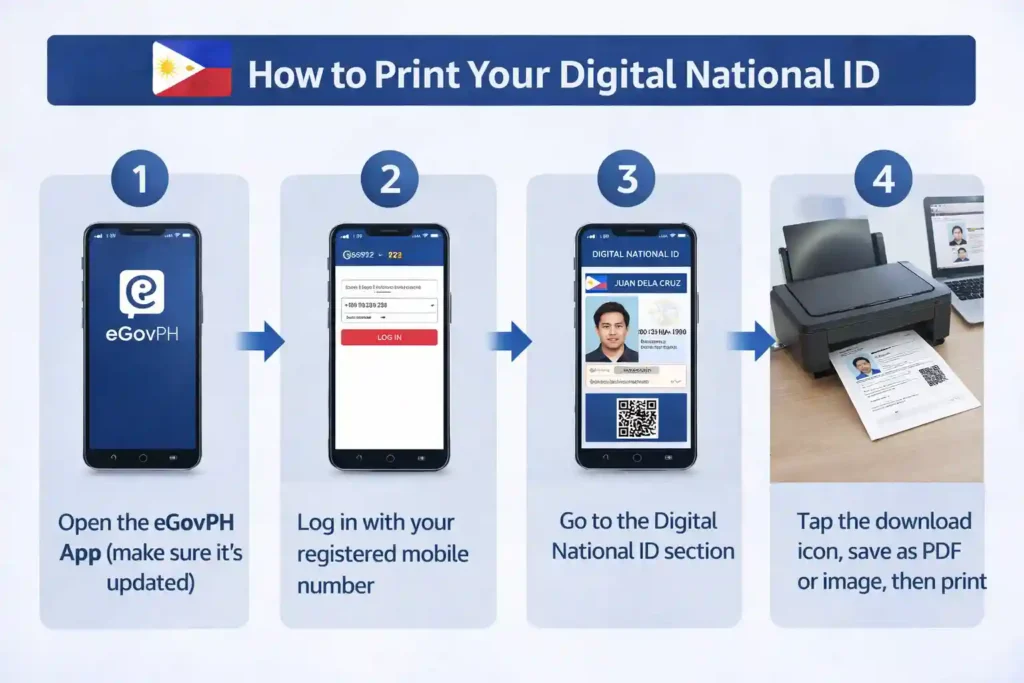
Once downloaded, you can print your National ID at home, at a computer shop, or anywhere with a printer by using regular A4 paper. The QR code will still work for National ID verification.
Getting the Official Paper ePhilID at a PSA Center
If you want an official paper version then:
Can You Print and Laminate Your Digital National ID
Yes, you can print your Digital National ID on paper and laminate it for protection. This is very common and helps your printed copy last longer.
However, you must never print your ID on plastic or PVC material. Only the official plastic card issued by the PSA is allowed. Any attempt to create your own plastic version is not permitted.
Helpful Tips for National ID Printing
Printing your National ID is simple, but a few small mistakes can cause problems during verification. Following the right steps ensures your printed copy is clear, scannable, and accepted everywhere. These practical tips will help you avoid common issues and make sure your ID works smoothly whenever you need it.
Print on the Right Paper Size and Quality
Make Sure the QR Code Works
Keep Both Digital and Printed Copies
Use Computer Shops if Needed
Laminate for Protection but Follow the Rules
Use It as a Temporary ID
Store It Safely
Always Download from Official Sources
Print Multiple Copies for Convenience
Check Before Leaving Home
Benefits of Having a Printed Copy
Having a printed National ID makes everyday tasks easier. You can present it at banks, airports, and government offices or provide a quick photocopy when needed. It is also useful if your phone runs out of battery.
Conclusion
Now you know exactly how to print your National ID. Whether you searched for national ID print, print digital National ID, or how to print the National ID, the process is simple and accessible to everyone.
Print your National ID today, keep a paper copy with you, and make daily transactions smoother. It is quick, often free, and very convenient.
If you still have questions about printing your National ID, feel free to ask and share this guide with others who need help.

I won’t tracking my national I’d
pls i need copy of my national ID
paper national id