Updated July 2026 | Independent PhilSys Guide | Not affiliated with PSA or any government agency
PHILSYS NATIONAL ID 2026
Still Waiting for Your National ID Card? You May Already Have a Valid One.
Around 34 million printed cards are stuck in the 2026 backlog. You do not have to wait for yours. Your Digital National ID and ePhilID are legally valid right now under RA 11055, and banks, hospitals, airlines, and government offices are required to accept them.
91M+
Filipinos already registered
Same Day
Digital ID after biometrics
Free
No fee at any step
34M
Cards stuck in printing
START HERE
I want my Digital National ID
The complete eGovPH walkthrough, all 8 steps, from installing the app to downloading your PDF.
MOST ASKED
Mine is not showing
Fixes for the ten most common problems: ID not appearing, OTP not arriving, selfie failing, QR not scanning.
Important: screenshots of your National ID are not valid. The QR code inside a screenshot cannot be scanned or verified. Always show the live ID inside the eGovPH app, or the official downloaded PDF.
FAST NAVIGATION
What Do You Need to Do?
Pick the situation that matches you and go straight to the answer.
START HERE
I want to download my Digital National ID
The complete eGovPH walkthrough, all 8 steps with screenshots
I have not registered yet
What to bring, walk in rules, and how long it takes
My card has not arrived
Track delivery and understand the 2026 printing backlog
Will banks and offices accept it?
Where the digital ID is valid and the law behind it
I want to read a full guide
Every National ID topic explained in detail
- Get Your Digital ID
- Digital ID Not Showing
- Fix Wrong Details
- Before You Register
- Documents Needed
- Requirements Checker
- How to Register
- After Registration
- Is It Valid
- Print Your ePhilID
- Track Your Card
- By Region
- For OFWs
- Seniors and PWD
- Verify an ID
- Scams and Fixers
- Where to Use It
- Real User Reports
- All Guides
- FAQ
THE BASICS
What Is the Philippine Digital National ID?
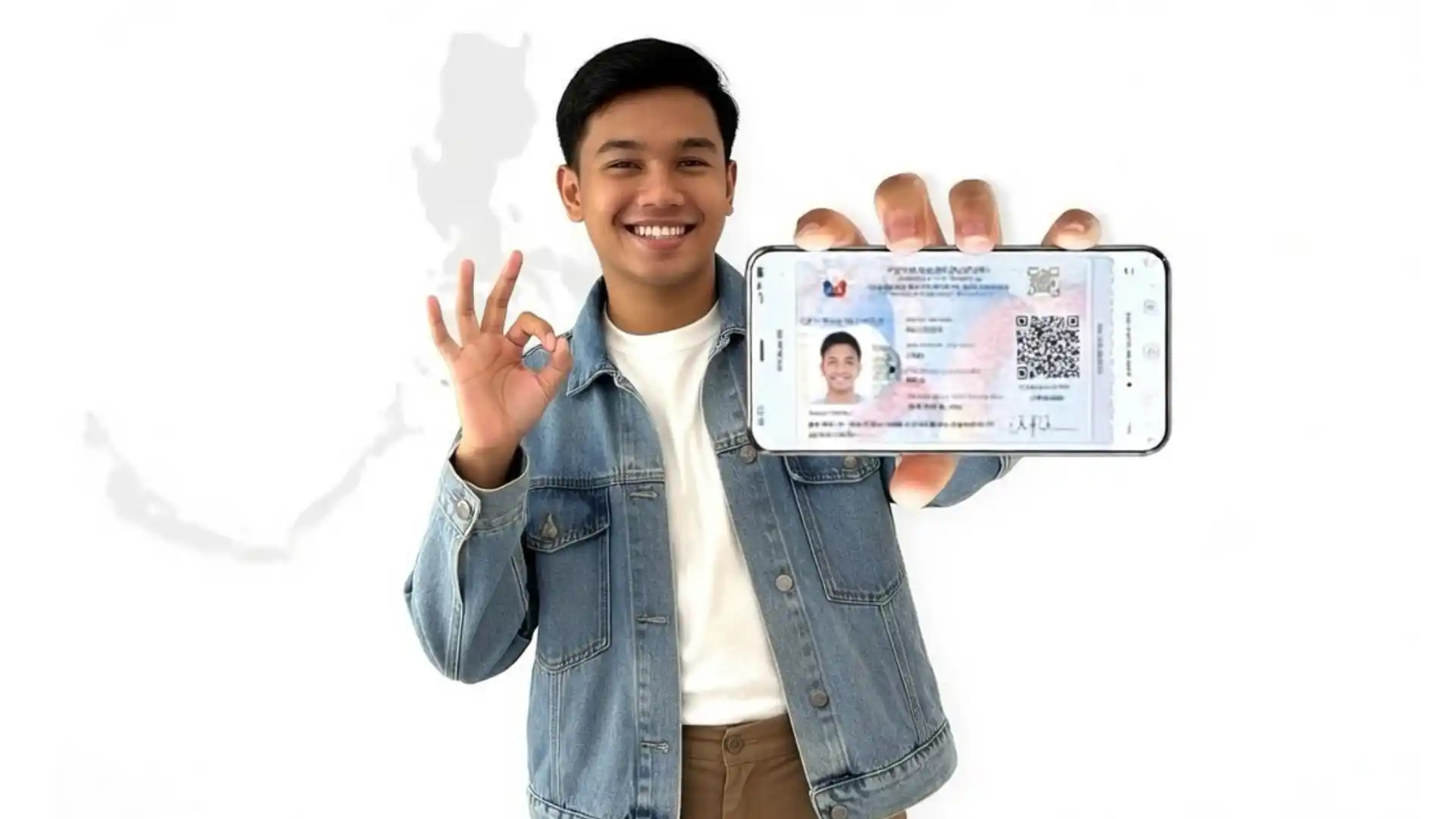
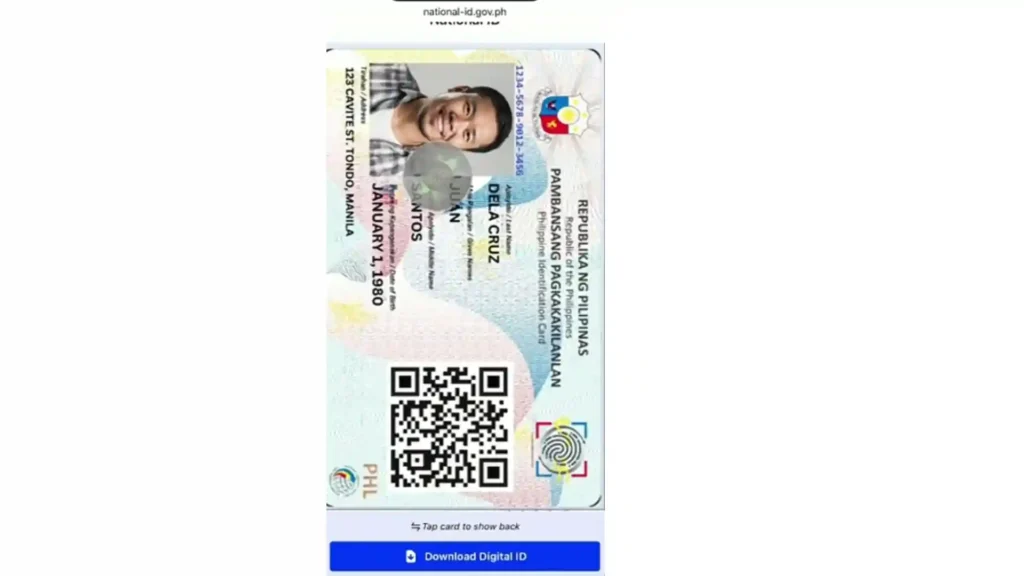
The Digital National ID is the online version of the PhilSys ID, also known as the PhilID. It lets Filipinos use their National ID through a phone, tablet, or computer without carrying the physical card. It shows the same information as the plastic card: name, photo, QR code, and PhilSys Number.
BEFORE PHILSYS
One Card Replaces Many
Filipinos used to carry several cards just to complete basic transactions. The PhilSys ID replaces the need to bring all of these:
One card now works across government offices, banks, hospitals, and businesses.
KEY BENEFITS
Why the National ID Matters
Four reasons the PhilSys ID replaced every other government ID.
100% Free
No Expiry Date
Valid Everywhere
Available Digitally
STEP 1
Before You Register: What to Know First
Most PhilSys problems happen before biometrics even begin. Some people arrive without the correct documents. Others expect online pre registration to be open, or assume every center accepts walk ins. A few minutes of preparation saves a wasted trip.
Can I Still Register in 2026?
Yes. PhilSys registration remains open for Filipino citizens and qualified resident aliens. Registration runs through PSA centers, selected government offices, and mobile registration activities. Availability changes by city, so confirm the schedule before you travel.
Do I Need an Appointment, or Can I Walk In?
It depends on the center. Some accept walk in applicants. Others require an appointment or serve a limited number daily. Where walk ins are accepted, arriving early gives you the best chance.
Can I Register Outside My Home City?
In most cases yes. Many applicants register outside their permanent address, although services and schedules differ. If you are an OFW home on a short visit, call the center first.
How Long Does Registration Take?
Once documents are screened, 30 to 60 minutes. That covers your photograph, all ten fingerprints, and the iris scan. Most people finish in one visit.
AVOID REJECTION
Check Your Documents Before You Leave Home
Bringing the wrong documents is the single most common reason applicants are turned away.
If documents show different names or birth dates, resolve that first. Correcting a document before registration is far easier than correcting your PhilSys record afterwards.
PRINT THIS
Quick Checklist Before You Visit
REQUIREMENTS
What Documents Do I Need?
To register for your PhilID card you must present valid proof of identity at any PSA or national ID registration center. Preparing the correct documents in advance avoids delays.
OPTION A
Bring ONE Primary Document
OPTION B
Or TWO Secondary Documents
Secondary documents are reviewed case by case. Bring every document you have.
REQUIREMENTS
National ID Requirements Philippines
The complete list of accepted primary and secondary documents, with the rules on originals, photocopies, and matching details across records.
WHERE TO GO
National ID Registration Centers
Find registration centers near you, the types of centers operating in 2026, and how to check schedules before you travel.
FREE TOOL
Build Your Personal Requirements List
Answer a few questions and download a personalised checklist as a PDF.
- Barangay clearance without a photo. No photo means identity cannot be verified.
- Damaged or faded School ID. The name and photo must be clearly readable.
- Hospital copy of birth certificate. Only the PSA-issued copy is accepted.
- Photocopy of any document. Originals are required. Photocopies are for backup only.
- Church-issued marriage certificate. Must be the PSA-issued copy, not the parish copy.
- Significantly expired UMID or driver's license. Some PSA offices reject these.
STEP 2
How Do I Register in 2026?
As of 2026, pre registration at register.philsys.gov.ph is temporarily disabled. Walk in is the only active method. No appointment is needed at most centers. Bring your documents and go to any national id registration center near you.
STEP 1
Find a Registration Center
Go to philsys.gov.ph and click Registration Centers. Centers operate at PSA offices, SM malls, Robinsons malls, post offices, and LGU halls. Most open Monday to Friday, 8 AM to 5 PM.
STEP 2
Arrive and Get Screened
A screener checks your documents and gives you a queue number. The full process usually takes 30 to 60 minutes once you are called.
STEP 3
Submit Documents and Fill the Form
A Registration Kit Operator encodes your data: full name, date of birth, home address, sex, civil status, and blood type.
STEP 4
Biometrics Capture
Staff capture your face photo, all ten fingerprints, and an iris scan. PSA dress code applies: no sleeveless tops, no shorts, no heavy makeup. Remove eyeglasses, earrings, and jewellery.
STEP 5
Review Your Information
Check the spelling of your name, birthdate, and address carefully before confirming. Errors here are much harder to fix later.
STEP 6
Receive Your Transaction Slip
You receive a 29 digit TRN. It is used for tracking your card, downloading your ePhilID, and accessing your digital ID. Ask staff if your ePhilID can be printed immediately.
FULL PROCESS
National ID Registration Step by Step
Everything that happens at each counter, what the Registration Kit Operator asks, and how long each stage takes on a normal day.
APPOINTMENTS
Do You Still Need an Appointment?
How the walk in system works in 2026, which centers still take bookings, and what happened to appt.philsys.gov.ph.
ELIGIBILITY
Who Can Apply for a Digital National ID?
Available to almost everyone who registers in the national identification system.
Once approved you can access your Digital National ID through eGovPH even if your physical card has not been printed yet.
STEP 3
How to Download Your Digital National ID
The digital national id, also called the electronic national id, is obtained through the eGovPH app. Follow these steps in order.
STEP 1
Download the eGovPH App
Search "eGovPH" on Google Play Store or Apple App Store. Install it and open the app. This is the official way to download your national id and access your national id online copy.
STEP 2
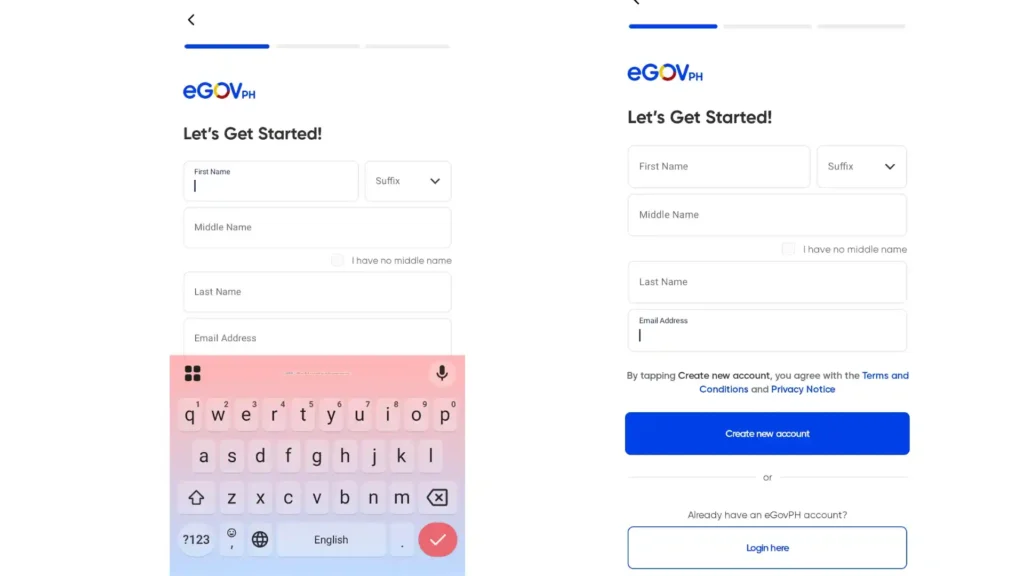
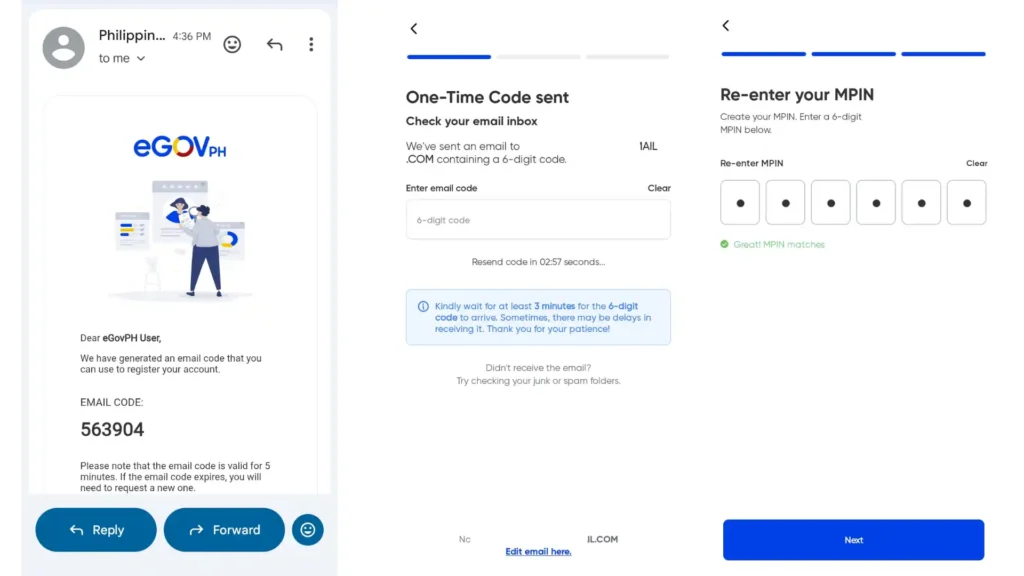
Create an Account
Register using your mobile number and email. Enter your full name and email to receive an OTP. Enter the code sent to your email and phone. Set a 6 digit MPIN for future access.
STEP 3
Tap the Digital ID Icon
Inside the app, tap the Digital ID icon to begin getting your national id digital version.
STEP 4
Enter Your Personal Details
Type your name and birthday exactly as recorded during registration. Even a missing middle initial causes an error. Then enter your address, phone number, and sex, and confirm.
STEP 5
Add Your Signature
You will be asked to add a signature digitally. You can skip this step, it is not mandatory.
STEP 6
Take a Live Selfie
The app runs live selfie verification. Tap launch camera and blink when prompted. Sit in good lighting facing a window. Remove glasses and face coverings. If it fails, try national-id.gov.ph in a browser or update eGovPH to version 2.0 or newer.
STEP 7
Submit a Valid ID
Upload one accepted primary ID: Postal ID, Passport, Driver's License, NBI Clearance, Voter's ID, an old National ID, UMID, or Senior Citizen ID. Check your information before submitting.
STEP 8
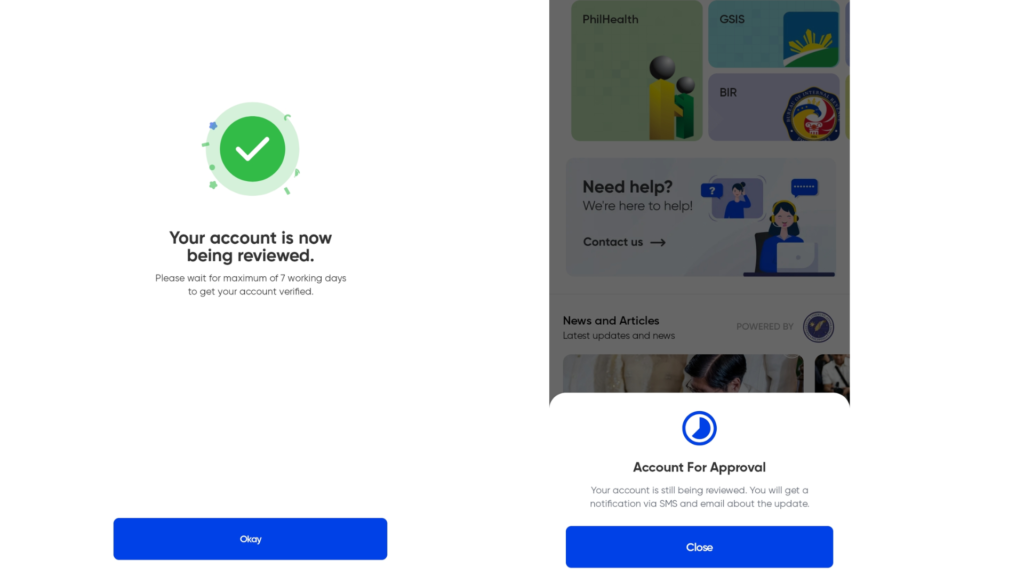
View and Save Your Digital ID
Your digital national id copy appears on screen. It takes about 7 days without an approved eGovPH account, or the same day if you have one. Download the PDF. The password is your birthday in MMDDYYYY format. Born 5 January 1990 means 01051990.

DEEP DIVE
National ID Digital Copy Explained
The complete guide to opening, downloading, and saving your Digital National ID, including the PDF password format and what to do when the file will not open.
TIMELINES
How Many Days to Get Your Digital ID
Realistic waiting times for the Digital National ID, the ePhilID, and the physical PVC card based on how the 2026 process actually runs.
STEP 4
What Happens After Registration?
Many people finish biometrics expecting the plastic PhilID card next. In practice there are several stages first: application processing, Digital National ID availability, and only then physical card delivery.
STAGE 1
Keep Your TRN Safe
Before leaving you receive a 29 digit TRN on your transaction slip. Do not throw it away. You need it to check status, follow up, contact support, and verify your details. Photograph the slip and keep the original safe.
STAGE 2
Your Registration Is Verified
Your information does not become available immediately. PhilSys verifies your details, documents, biometrics, and identity records. This takes different amounts of time depending on volume. A delay does not mean something went wrong.
STAGE 3
Your Digital ID May Arrive First
This surprises most applicants. Many get the Digital National ID in eGovPH well before the PVC card is printed. Check the app rather than waiting by the door. Many Filipinos keep waiting for plastic without realising they already have a valid digital version.
STAGE 4
Download and Save It
Sign in to eGovPH, complete verification if asked, open your Digital National ID, and download the PDF. The password is your birthday in MMDDYYYY format. Save a copy where you can reach it without mobile data.
STAGE 5
Wait for the Physical Card
The digital and physical versions do not arrive together. It is normal to hold the digital ID for weeks or months before PHLPost delivers. Keep checking with your TRN and keep using the digital version. Do not register again.
STAGE 6
Why Does My Friend Have Theirs?
Applications are not processed in submission order. Two people who registered the same day can receive access weeks apart because of verification differences, record matching, and workload. It does not mean your application failed.
QUICK ANSWERS
Common Questions Right After Registration
PAPER COPY
How to Get Your ePhilID
The printed ePhilID explained: where to claim it, how to download it with your TRN, and why it is valid from the day it is printed.
PRINTING
How to Print Your Digital National ID
Printing at a registration center versus printing at home, paper rules, lamination, and what makes a printed copy invalid.
FIXES
Why Is My Digital National ID Not Showing?
If you completed registration but cannot see your Digital National ID, the cause is usually processing time, account verification, an app problem, or a mismatch in your details. Here are the problems Filipinos report most and what actually fixes them.
Not Showing After Registration
The most common problem reported. Your record is likely still in verification and processing.
eGovPH Account Not Verified
Some people create an account but cannot open the Digital ID because verification never completed, usually from a details mismatch.
Selfie Verification Keeps Failing
One of the biggest complaints. Poor lighting causes most of it, not a problem with your record.
I Did Not Receive My OTP
If the code never arrives, the cause is usually signal, a typo in the number, or too many requests too quickly.
The App Will Not Open or Keeps Loading
Blank screens, freezing, and endless loading usually mean an outdated version or a dropped connection.
My QR Code Will Not Scan
The QR code proves your ID is authentic. If a bank cannot scan it, the fix is almost always screen quality.
My Information Is Wrong
Some find a misspelled name, wrong birthday, missing middle name, or old address once the ID appears.
My Friend Has Theirs and Mine Is Missing
This happens constantly and worries people more than it should. Applications are not completed at the same speed.
Months Later and Still Nothing
If it has genuinely been months with no movement, check rather than waiting longer.
Should I Just Register Again?
No. This is the most damaging thing you can do while waiting, and it is very common.
BEFORE YOU CALL
Quick Troubleshooting Checklist
Still Cannot Access Your Digital National ID?
Have these ready before you contact PhilSys so the conversation is quick:
Contact PSA hotline 1388, email [email protected], or use in app support inside eGovPH.
VERIFY
National ID Verification
How to confirm any National ID is genuine using the QR code and everify.gov.ph, and what a valid result looks like on screen.
LOST OR DAMAGED
National ID Replacement
Replacing a lost, stolen, or damaged card: the affidavit you need, the current fee, and when PSA waives it completely.
THE LAW
Is the Digital National ID Official and Valid?
Yes. The national id digital copy valid status is confirmed under RA 11055. The digital ID shown through eGovPH, or downloaded as a PDF, has full legal weight. Any institution refusing it violates the law.
Important: Screenshots Are Not Valid
A screenshot cannot be verified because the QR code inside it cannot be scanned. Always show the live version from the eGovPH app or the official downloaded PDF. Printing on PVC plastic to imitate the physical card is illegal under RA 11055.
PAPER COPY
How to Get a Printed ePhilID
Two ways to hold a valid National ID in your hand today.
OPTION 1
Print at a Registration Center
Staff verify your biometrics and print your national id on the spot.
OPTION 2
Download and Print at Home
Do not print on PVC card material or anything imitating the plastic card.
USE IT NOW
Your ePhilID Works Today
The ePhilID is not a lesser version. It is fully valid everywhere under RA 11055. Banks, hospitals, government offices, and airlines must accept it. Start using it immediately. Do not wait months for the plastic card.
DELIVERY
How to Track Your PhilSys National ID
After registration your physical card is printed by BSP and delivered by PHLPost. This is Step 3 of the official process and can take several months.
STEP 1
Visit PHLPost
Go to tracking.phlpost.gov.ph, the official portal. It is the only accurate way to do national ID tracking in real time.
STEP 2
Enter Your Tracking Number
Type your full 29 digit transaction number with no spaces or dashes. Tracking by name is not officially supported, always use the TRN.
STEP 3
Read Your Delivery Status
Statuses run Printed, Dispatched, Out for Delivery, then Delivered. Once dispatched it usually arrives within 2 to 4 weeks. Metro Manila is typically faster.
2026 BACKLOG
Why Is My Card Delayed?
Physical card printing is currently on hold due to BSP contract processing, affecting roughly 34 million cards. If your status is stuck at Printed or Processing for months, this is why. Use your ePhilID or Digital National ID meanwhile. Email [email protected] with your TRN for an update. No need to re register.
TRACKING
National ID Tracking with Your TRN
Follow your card through every PHLPost delivery stage, decode what Printed, Dispatched, and Out for Delivery actually mean, and know when to escalate.
BY REGION
Registration and Delivery Across the Philippines
Registration access and card delivery are not the same everywhere. Where you live affects which centers are available, how long PHLPost takes, and whether mobile registration teams operate.
Metro Manila and Urban Centers
In the National Capital Region and other large cities, centers are commonly hosted inside SM and Robinsons malls, PSA offices, and city halls. Mall based centers follow mall hours rather than government hours, which helps if you work weekdays. PHLPost delivery to Metro Manila is generally faster once dispatched.
Provincial Luzon and the Visayas
Outside major cities, registration is handled at PSA field offices, municipal halls, and post offices. Smaller municipalities run fewer registration kits, so daily capacity fills early. Delivery takes longer because packages route through regional hubs first.
Mindanao and Island Municipalities
Coverage relies more on scheduled activities than permanent centers in some areas. Delivery times vary most here since packages may need sea transport on the final leg. If tracking sits at dispatched a long time, distance and routing are usually the reason.
Geographically Isolated Areas
For GIDA communities, the PSA runs mobile registration through National ID on Wheels and National ID on Boat. Teams travel to remote barangays and island communities. Schedules are announced locally, so ask at your barangay hall.
OVERSEAS FILIPINOS
National ID for OFWs: Registering From Abroad or on Home Leave
Overseas Filipino Workers face a problem nobody else does. Registration needs your physical presence, delivery needs a Philippine address, and home leave is short. Here is how to work around all three.
OPTION 1
Register at an Embassy or Consulate
Selected Philippine embassies and consulates run PhilSys registration for Filipinos in their jurisdiction. Availability depends on the post and is usually announced as a scheduled activity rather than a permanent service.
OPTION 2
Register During Home Leave
Most OFWs register while home on vacation. The registration itself takes 30 to 60 minutes, so it fits into a single morning if you prepare properly.
THE REAL OFW PROBLEM
Your Card Arrives While You Are Abroad
PHLPost delivers the physical PhilID to a Philippine address, and delivery can take months. If nobody is home to receive it, the card can be returned or delayed further. This catches out a large number of OFWs.
WORKS ABROAD
What Your Digital ID Can Do Overseas
DOES NOT REPLACE
What It Cannot Do Overseas
PRIORITY REGISTRATION
National ID for Senior Citizens and Persons With Disabilities
Seniors and PWDs are entitled to priority handling at every registration center. Many people do not know this and queue with everyone else for hours. Here is what you are entitled to and how to ask for it.
YOUR RIGHT
Priority Lanes Are Not a Favour
Registration centers operate priority lanes for senior citizens, persons with disabilities, and pregnant women. You do not need to justify the request or wait for it to be offered.
DOCUMENTS
What Seniors and PWDs Should Bring
The document requirements are the same as everyone else, with one useful addition.
BIOMETRICS
If Fingerprints Cannot Be Captured
Age, manual work, medical conditions, and some disabilities can make fingerprints difficult or impossible to capture. This does not disqualify you from registering.
CANNOT TRAVEL
For Bedridden and Homebound Filipinos
Registration requires physical presence, which is a genuine barrier for people who cannot leave home. There are routes, but they run through your local government rather than online.
AFTER YOU REGISTER
Using the National ID for Senior Benefits
Your PhilSys record makes benefit verification faster, but it does not replace your Senior Citizen ID for discounts.
FIX YOUR RECORD
How to Correct Wrong Information on Your National ID
A misspelled name, a wrong birthdate, or a missing middle name will follow you through every transaction where your ID has to match another document. Corrections are possible, they are usually free when reported early, and they always happen in person.
DO THIS FIRST
Three Things That Make Corrections Worse
STEP 1
Identify What Is Actually Wrong
Compare your ID against your PSA birth certificate, which is the document PhilSys treats as authoritative. Errors fall into two very different categories.
STEP 2
Bring the Right Documents
Which document you need depends on what you are changing.
STEP 3
Go to a PhilSys Registration Center
Corrections cannot be filed online, by email, or through the hotline. You have to appear in person at a center or PSA office.
STEP 4
What Happens Next
A correction is a re verification, so it takes time. Plan around it rather than waiting for a notification.
DIFFERENT PROBLEM
When Your Fingerprints Will Not Match
Some people find verification fails even though their written details are correct. This is a biometric problem, not a data error, and it needs a different fix.
The Corrections People Request Most
Missing Middle Name
Extremely common and it causes eGovPH verification to fail, because the app expects an exact match against your PhilSys record.
Bring: PSA birth certificate
Misspelled Surname
Often a transcription error at the registration counter. It will block transactions where your ID must match a bank or government record.
Bring: PSA birth certificate
Wrong Birthdate
Affects the PDF password for your downloaded ID, since the password is your birthday in MMDDYYYY format, as well as age based eligibility.
Bring: PSA birth certificate
Married Name Not Reflected
Your ID still shows your maiden name after marriage, causing mismatches with newer documents.
Bring: PSA marriage certificate
Old or Wrong Address
Matters most for card delivery, since PHLPost sends the physical card to the registered address.
Bring: Utility bill or barangay certificate
Wrong Blood Type or Sex
Less common but worth correcting, particularly blood type given the ID is used in hospitals.
Bring: PSA birth certificate or medical record
AUTHENTICITY
How to Verify a National ID
Confirm any National ID is genuine in seconds using the QR code.
CORRECTIONS
Update or Correct Your Information
Changes like marriage, address updates, or corrections require visiting a PhilSys center. Bring:
The first replacement is usually free. Lost national ID card replacement costs about ₱135 unless waived.
Safety tip: only allow trusted institutions like banks, hospitals, or government offices to scan your QR code. Never share your PSN publicly.
THREE FORMATS
National ID Formats: Types of PhilSys ID
Once you complete registration and receive your TRN you can access your National ID in three formats. All three are equally valid under RA 11055.
Physical Card
Printed by BSP and delivered to your home by PHLPost. Takes months. You do not claim it, it comes to your door.
ePhilID Paper
Available same day at many centers or downloadable from ephilid.philsys.gov.ph. Print on A4 bond paper. Fully valid immediately.
Digital ID
Available on your phone via eGovPH or national-id.gov.ph. Accessible the same day biometrics are processed.
COMPARED
Digital National ID vs ePhilID
Both are part of the national identification system and issued under RA 11055. One is fully digital and accessed through a mobile app, the other is a printed paper version.
|
Feature |
Digital National ID |
ePhilID |
|---|---|---|
|
Format |
Digital version displayed on a smartphone |
Printed paper version |
|
Access Method |
Available through the eGovPH App |
Issued at PhilSys registration centers |
|
Verification |
Uses QR code for real-time verification |
Can be visually verified or scanned |
|
Availability |
Accessible anytime after identity verification |
Provided while waiting for the physical card |
|
Storage |
Stored securely inside the mobile application |
Physical paper document |
|
Issuing Authority |
Philippine Statistics Authority |
Philippine Statistics Authority |
|
Primary Use |
Digital identity verification for online and offline services |
Temporary valid ID until the physical card arrives |
ON THE CARD
What Is Printed on the National ID?
Every field, number, and security feature on the PhilID explained.
FRONT
Front of the Card
BACK
Back of the Card
Security Features
YOUR PSN
Where to Find Your PhilSys Number
SEE IT
National ID Sample Philippines
See exactly what the front and back of the PhilID card look like, with every security feature labelled so you can spot a fake.
EVERYDAY USE
Where Can I Use My National ID?
The National ID is accepted across government and private transactions nationwide.
Banking
Opening bank accounts is easier. Banks and wallets like GCash and Maya verify identity quickly using the QR code.
Government Benefits
Programs like 4Ps, DSWD cash assistance, and PhilHealth verify beneficiaries faster, so benefits reach people sooner.
Healthcare
Hospitals confirm your identity and check PhilHealth membership, speeding up admission.
Government Transactions
Accepted by SSS, PhilHealth, Pag-IBIG, NBI, LTO, and DFA. No need to bring several IDs.
Domestic Travel
Valid for travel within the Philippines. Airlines accept it for domestic flights.
SIM Registration
Accepted for SIM registration by Globe, Smart, and DITO.
Employment
Employers verify identity using the QR code, making hiring faster and safer.
Senior Benefits
Seniors use their PhilSys record to access pension programs and DSWD assistance.
Identity Protection
Biometric data and the QR code help protect against identity theft and fraud.
E-WALLETS
Verify GCash With Your National ID
Use your Digital National ID to complete GCash verification, raise your wallet limits, and unlock the features that need a fully verified account.
TRAVEL
Digital National ID for DFA Passport
Using the Digital National ID and ePhilID as your primary document at a DFA passport appointment, and what to bring as backup.
NEW IN 2026
What Are the Latest Updates?
Recent changes to the PhilSys programme worth knowing about.
Local Government Online Services
Mobile Registration for Remote Areas
Senior Citizen Benefits
COMPARISON
How Does It Compare to Other Government IDs?
The National ID against every other Philippine government ID.
|
Feature |
National ID |
SSS/UMID |
Driver's License |
Voter's ID |
Passport |
|---|---|---|---|---|---|
|
Who can get it |
All Filipinos |
SSS members |
Drivers |
Voters |
Anyone |
|
Free |
Yes |
Yes |
No |
Yes |
No |
|
Expiry |
None |
Partial |
5 years |
None |
5–10 years |
|
Digital Copy |
Yes |
Limited |
No |
No |
No |
|
QR Code |
Yes |
Barcode |
No |
No |
No |
|
Biometrics |
Full |
Partial |
Photo |
Photo |
Photo |
The Philippine National ID is the only ID that is free, valid for life, and fully digital.
REAL USER REPORTS
What Filipinos Are Actually Complaining About Online
These are the problems Filipinos raise again and again on Reddit, X, and Facebook groups. Many of those threads run to a hundred comments of people describing the same experience. Here is what is really happening in each case and what you can do about it.
PROBLEM 1
Waiting Years for the Physical Card
The single most repeated complaint. People registered in 2021 or 2022 and still have no plastic card in 2026. Threads titled asking where their National ID is fill up with identical stories from every region.
PROBLEM 2
The Digital ID Gets Refused at the Counter
People ask what the point of the eGovPH digital ID is when shops, clinics, and offices will not honour it. This is the second biggest source of frustration and it is a staff training problem, not a problem with your ID.
PROBLEM 3
Printed and Laminated ePhilID Called Fake
Filipinos describe being told their laminated paper ID is fake, and in the worst stories being asked to wait while security is called. This happens because many people have never seen an ePhilID before.
PROBLEM 4
Registration Website Crashing or Unavailable
Going back to the earliest registration waves, people report the PSA site glitching, timing out, or going down entirely on busy days. The pattern repeats whenever a new registration push is announced.
PROBLEM 5
Wrong Name, Birthdate, or Biometric Mismatch
People discover a misspelled name, an incorrect birthdate, a missing middle name, or find their fingerprints will not match during verification. Data errors are one of the hardest problems to resolve after the fact.
PROBLEM 6
Accidentally Registered Twice
Some people registered a second time after months of silence, assuming the first attempt failed. The system then flags the duplicate and the record takes longer to resolve, not less.
PROBLEM 7
Digital ID Not Appearing in eGovPH
Across Facebook groups and Reddit this is the most common technical question. People complete registration, install the app, and the Digital National ID simply is not there.
PROBLEM 8
Replacing a Lost or Damaged Card Is Slow
People who lose a card they waited years for find the replacement process discouraging, especially when the original never arrived in the first place.
PROBLEM 9
Staff Insist It Is Not a Valid ID
Separate from outright refusal, people report being told by managers and frontline staff that digital or paper versions do not count. The information gap is on the institution's side.
PROBLEM 10
It Was Supposed to Be One ID for Everything
A recurring frustration is that the National ID was promised as a single ID replacing all others, yet people still find themselves asked for additional documents, and still need an existing ID to get other IDs like a passport.
ALSO FREQUENTLY ASKED
Two More Questions That Come Up Constantly
PROTECT YOURSELF
National ID Scams and Fixers: How to Spot Them
The long waiting times created an opening for scammers. Fixers promise to rush your card, fake websites collect your details, and text messages ask for fees that do not exist. Every part of PhilSys registration is free, and no one can move you up the queue.
THE SINGLE RULE
Nobody Can Speed Up Your National ID
There is no priority lane, no express processing, and no paid shortcut. Cards are printed in batches by the BSP and delivered by PHLPost. A person claiming they have a contact inside PSA who can rush your card is lying to you. If money is being asked for at any stage, it is a scam.
ALWAYS FREE
What You Never Pay For
THE ONLY LEGITIMATE FEE
Card Replacement, Around 135 Pesos
The single official charge in the whole system is replacing a lost, stolen, or damaged card. It is paid directly at a PhilSys registration center, never to an individual, never through GCash to a personal number, and never in advance.
The Six Scams Filipinos Report Most
SCAM 1
The Fixer at the Registration Center
Someone approaches you in the queue offering to skip the line, guarantee approval, or handle your paperwork for a fee. They may look official and may even know staff by name.
SCAM 2
Fake Registration Websites
Sites that copy the PhilSys look and ask for your full name, birthdate, address, and sometimes a payment to register or to check your status. They rank in search results and look convincing.
SCAM 3
Text and Messenger Scams
Messages claiming your National ID is ready and asking for a delivery fee, a processing charge, or your details to confirm identity. Often sent from ordinary mobile numbers.
SCAM 4
Selling Fake PVC Cards
Sellers on social media offer to print your National ID onto plastic so it looks like the official card. Some frame it as a helpful service while you wait.
SCAM 5
Buying or Sharing PhilSys Numbers
Offers to obtain a PhilSys Number without registration, or requests to share your PSN in exchange for help, assistance, or a benefit.
SCAM 6
Fake Benefit and Assistance Claims
Messages saying your National ID qualifies you for cash aid, a subsidy, or a government payout, and asking you to confirm details or pay a release fee.
WALK AWAY IMMEDIATELY
Seven Red Flags
IF YOU WERE TARGETED
What to Do Next
IF YOU SHARED YOUR PSN
Limiting the Damage
OFFICIAL ONLY
National ID Websites and Contacts
Use only official government websites to avoid scams.
PSA Hotline
Dial 1388
PhilSys Main Website
philsys.gov.ph
Digital National ID Portal
national-id.gov.ph
ePhilID Download
ephilid.philsys.gov.ph
PhilSys Email Support
Appointment Portal
appt.philsys.gov.ph
Verification Portal
everify.gov.ph
PHLPost Tracking
tracking.phlpost.gov.ph
QUESTIONS
Frequently Asked Questions
Short answers to what Filipinos ask most about the National ID.
IN SUMMARY
One ID for Every Filipino
The Philippine National ID system gives every Filipino a single trusted proof of identity. With one ID you can access banking, government services, healthcare, travel, and everyday transactions without carrying several different cards.
Even if the physical PhilID card has not been delivered, your identity is already active once you complete registration. The Digital National ID in eGovPH and the printed ePhilID are both official versions and can be used while you wait.
If you have not registered yet, visit your nearest PhilSys registration center. Registration is free, and once done you can begin using your National ID nationwide.