Lost PhilID? National ID Replacement Requirements & Process
National ID replacement is the process of getting a new Philippine National ID card if your original one is lost, stolen, or damaged. Since the PhilSys ID is one of the most important government IDs in the country, losing it can make many transactions difficult. You may need it for banks, government services, mobile wallets like GCash, and passport applications with the Department of Foreign Affairs.
The good news is that requesting a replacement is simple. The new card issued by the Philippine Statistics Authority will still contain your same PhilSys Number (PSN) and personal details, so it remains a fully valid ID.
In this guide, you will learn how to apply for National ID replacement, the requirements, the replacement fee, and how long it usually takes to receive your new PhilID card.
What Is National ID Replacement?
National id replacement means getting a new official plastic PhilID card when your original one is lost, stolen, or damaged. The new card will have the same PhilSys Number and all your personal details.
Important Note: While you wait for the new plastic card, you can still use your printed ePhilID or Digital National ID from the eGovPH app. Both are accepted everywhere.
Requirements for National ID Replacement
The requirements for replacement of national id are different depending on the reason.
For Lost or Stolen:
For Damaged National ID:
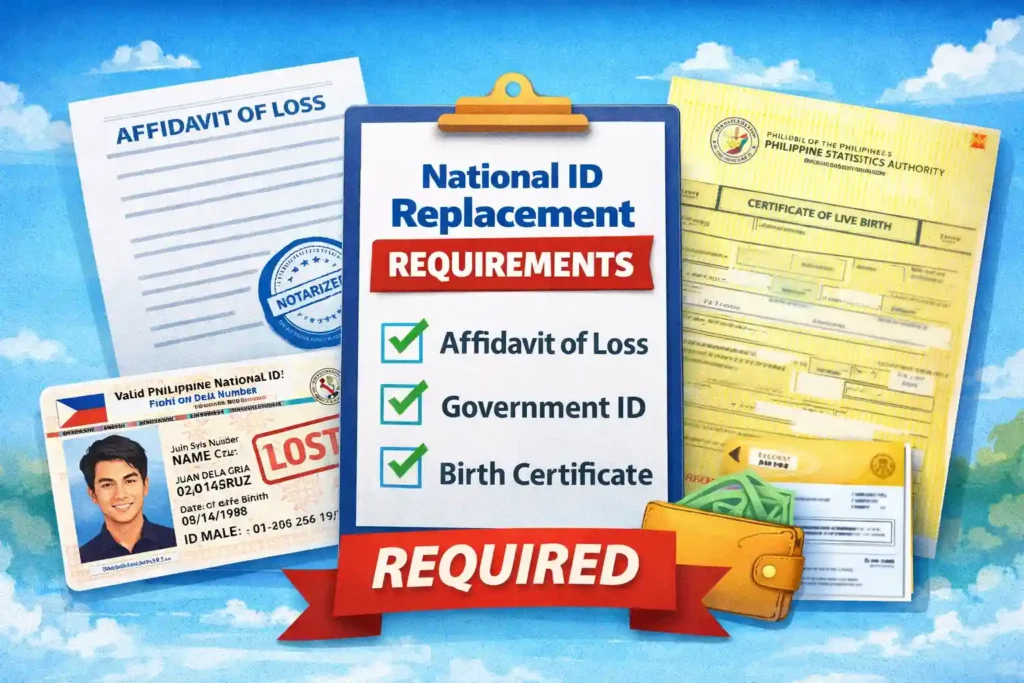
These are the standard national id replacement requirements for lost national id replacement right now.
How to Request National ID Replacement: Step-by-Step
Here is the exact national id replacement process in 2026:
For Lost or Stolen National ID
For Damaged National ID
Most people finish the whole how to get replacement national id process in one visit.
How Much Is the National ID Replacement Fee?
The replacement fee for national id:
This national id replacement fee Philippines is the standard rate in 2026. You pay it at the PSA center when you submit your request.
How Long Does National ID Replacement Take?
Where to Get National ID Replacement
You can request replacement national id at:
Check the latest list of national ID registration centers on the official PhilSys website.
Digital National ID: Your Best Alternative While Waiting
If you lost your physical National ID, do not worry. You can get a Digital National ID instantly and use it for almost everything.
Here is how to get it:
This digital version has the same legal power as the plastic card. You can show it on your phone for:
It is free, always with you, and has a scannable QR code. Use this while waiting for your new physical card to arrive.
Extra Helpful Tips for National ID Replacement
Benefits of Getting a Replacement National ID
Getting a replacement National ID is very helpful if your original card is lost, stolen, or damaged. It allows you to continue using your ID for many important services in the Philippines. Here are some simple benefits of getting a replacement card:
You Get a New Valid National ID Card
When you apply for a replacement, you receive a brand-new National ID card. This new card works the same as your original one and is accepted across the Philippines as a valid government ID.
You Can Use It Again for Important Services
Your National ID is often required to verify your identity. With your replacement card, you can again use it for banks, your GCash account, passport applications through the Department of Foreign Affairs, loan applications, and many other government or financial services.
The Process Is Simple and Affordable
Applying for a replacement National ID is not complicated. You only need to follow the steps provided by the Philippine Statistics Authority. The replacement fee is also very affordable for most people.
It Gives You Peace of Mind
Having your physical ID card again helps you feel secure. You won’t have to worry when an office or bank asks for a valid ID.
Easier Access to Government and Private Services
Many offices, banks, and businesses accept the National ID. With your replacement card, you can quickly complete transactions and access services without delays.
In short, getting a replacement National ID helps you continue using important services and keeps your identity verified and secure.
Conclusion
Whether you need lost national id replacement or just want to know the Philippine national id replacement process, now you know exactly what to do.
Do not worry if you lost or damaged your card. The national id replacement process is simple, affordable, and the new card will be just as valid as the old one.
Head to the nearest PSA RSSO or PSO this week and get it sorted. While waiting, keep using your digital or printed ePhilID because they are accepted everywhere.
If you still have questions about how to get national id replacement or anything else, drop them in the comments below. And check out our other guides on registration, ePhilID, and tracking your card on this site.

One Comment